
Plagiarism and AI detection for Google Classroom
Checkmark connects directly with Google Classroom to review text similarity, AI-writing indicators, Google Docs revision history, and student submissions-right inside your existing teacher workflow.
Native Google Docs & Classroom workflow
Teachers can enable Checkmark on any Google Classroom coursework with a single click. Rosters, student Google Docs attachments, and rubrics synchronize effortlessly.
Seamless integrity checks in Google Workspace for Education
Checkmark integrates into Google Classroom to give educators actionable, evidence-backed insight into student writing while keeping every step inside Google's familiar environment.
Access from Google Classroom
Teachers open similarity reports and AI assessments directly from the Google Classroom assignment grading panel.
Google Docs Revision Analysis
Inspect complete Google Docs version histories to evaluate writing velocity, external paste events, and session duration.
Plagiarism & AI Detection
Compare student submissions against web sources and peer files while identifying AI-generated writing indicators.
How the Google Classroom integration works
A simple 6-step workflow designed for teachers and school administrators.
Connect Checkmark to Google Classroom
Administrators deploy the Google Workspace Add-On or teachers authorize Checkmark with Google OAuth in seconds.
Sync classes & coursework
Checkmark automatically imports your Google Classroom courses, active rosters, and assignment details.
Students submit work as usual
Students work in Google Docs and attach their files directly to Google Classroom assignments.
Checkmark analyzes submissions
Text similarity matches are flagged against millions of web pages, while document history records writing patterns.
Teachers review the integrity report
Open side-by-side quote comparisons, uncited source highlights, and typing playback without leaving Classroom.
Return grades and feedback
Apply rubric scores and post comments back to Google Classroom with automatic gradebook updates.
Features built specifically for Google Classroom
Purpose-built tools that align with Google Workspace workflows and classroom management.
Classroom Add-On Support
Launch Checkmark reports directly within Google Classroom coursework without separate browser tabs or logins.
Google Docs Version Signals
Capture revision timelines, keystroke activity, and external paste events straight from Google Docs API metadata.
Roster & Course Sync
Class rosters, student enrollments, and section updates stay synchronized dynamically as students join or switch classes.
Rubric & Grade Sync
Convert Google Classroom rubrics into automated evaluation criteria and send calculated scores to the gradebook.
Google OAuth Single Sign-On
Zero new accounts for students to create or remember. Sign in with official district Google Workspace credentials.
Teacher Privacy Controls
Originality flags and AI breakdown metrics remain private to educators until reviewed and released to students.
How teachers review work in Google Classroom
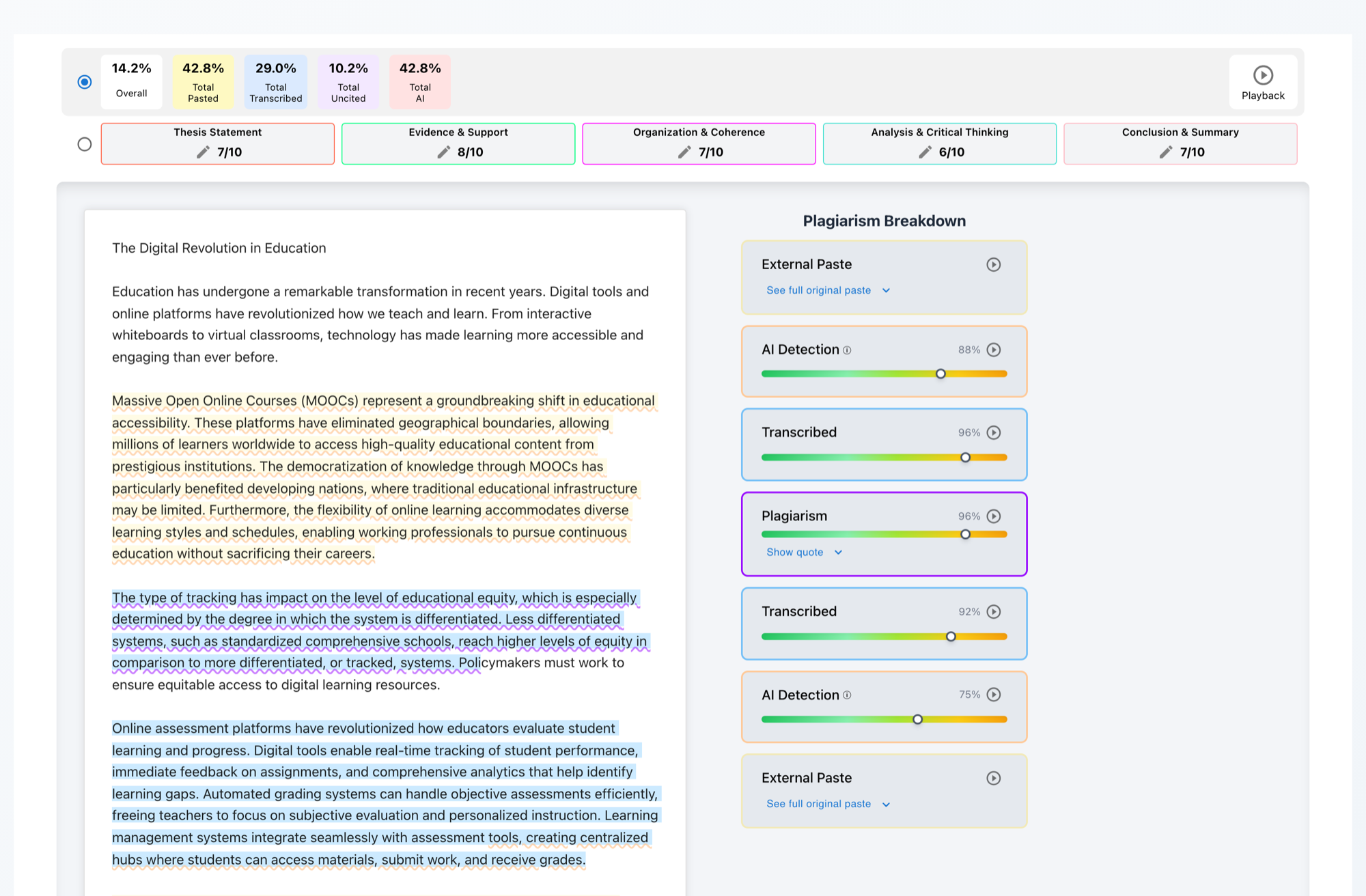
When a student turns in a Google Doc, Checkmark generates an integrity tile next to the submission. Clicking the tile opens the comprehensive breakdown:
- Side-by-side matches: View exact internet and student peer match passages.
- AI writing indicators: Examine writing pattern metrics with confidence ranges.
- Keystroke replay: Watch how the essay was composed over multiple revision sessions.
- One-click grade posting: Push scores directly to Google Classroom grading.
Administrator & Setup Information
District administrators can deploy Checkmark across all Google Workspace schools via Google Workspace Marketplace domain-wide install, or individual teachers can authorize course access with OAuth 2.0.
Authentication Method
Google OAuth 2.0 & OpenID Connect Single Sign-On.
Required Permissions
Classroom courses, coursework, rosters (read) & grades (write).
Data Security & FERPA
Fully FERPA compliant. Data encrypted in transit & at rest; non-training policy.
Why schools choose Checkmark for Google Classroom
Keeps review inside Google Classroom
Teachers never need to manage separate class lists or upload documents manually. Everything flows naturally.
Evaluates revision history evidence
Go beyond simple percentage scores by analyzing Google Docs version history and copy-paste signals.
Simplifies district implementation
Deploy domain-wide in 15 minutes with Google Workspace Marketplace administrative controls.
Frequently Asked Questions
Google Classroom integration FAQ
Everything you need to know about Checkmark and Google Classroom.
Bring Checkmark to Google Classroom
Start reviewing plagiarism, AI signals, and Google Docs revision history in your Google Classroom workflow today.